
Match & Size
Hunter's first two stages: the strategy universe, stop-loss, width and premium filters, the two lookback periods, and capital, portfolio size and contract allocation.
The Settings tab is a three-stage form. This page covers Stage 1 — Match
(which strategies may enter the pool, and over which windows they are
measured) and Stage 2 — Size (capital, portfolio size and contracts); the
third stage has its own page, Guardrails. Every
field marked * is required and starts empty — the form's own footnote:
"Required to run. Fields without an asterisk can be left blank or switched
off."
Stage 1 — Match
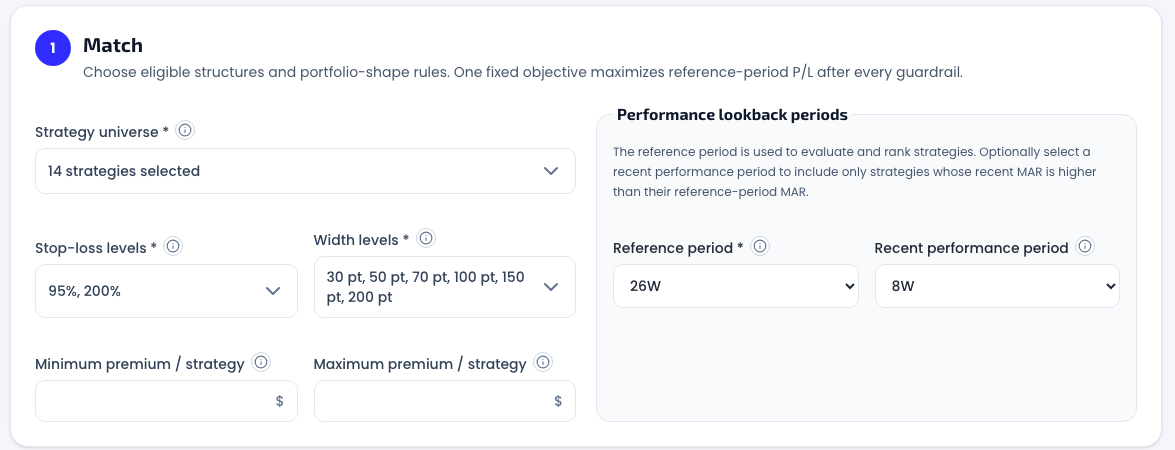
Strategy universe
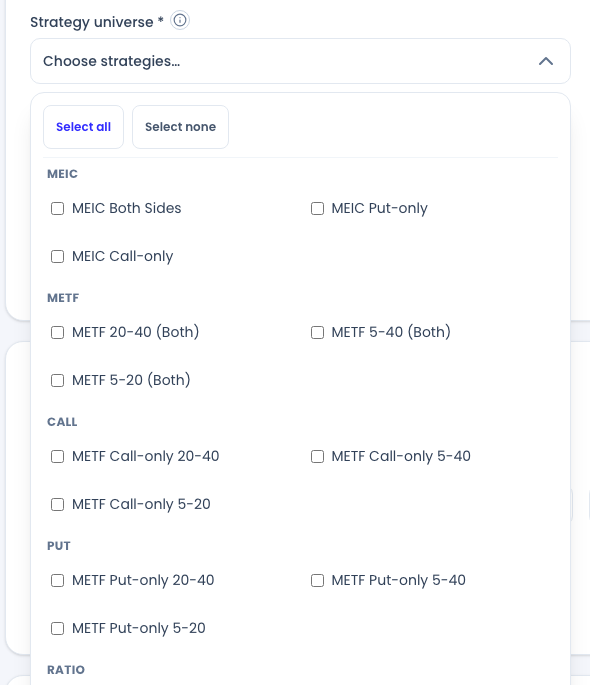
The Strategy universe dropdown offers the same 14 database variants the Strategy Browser knows, grouped by family: MEIC (Both Sides, Put-only, Call-only), METF with its three EMA pairs (20-40, 5-40, 5-20) in Both-Sides form, PUT and CALL (the METF single-sided variants, three EMA pairs each), and RATIO (1P:2C and 1C:2P). Tick any subset, or use Select all / Select none. The product's own example says it plainly: "selecting only MEIC and METF means CALL, PUT, and RATIO strategies cannot appear in any result."
Stop-loss and width levels
Two multiselects control which variants may enter the pool:
- Stop-loss levels — any subset of 95% / 150% / 200%. Stop-loss is a percentage of the credit collected (a 200% stop closes the trade at 2× the premium). Tighter stops cap the per-trade loss but stop out more often; wider stops ride through more noise. An unticked level is out of the universe entirely.
- Width levels — any subset of 30 / 50 / 70 / 100 / 150 / 200 points. Wider spreads have more room before max loss and bind more buying power per contract; narrow ones are cheap but hit max loss quickly. In the original Hunter, width could only be shaped indirectly — the explicit width filter is new in Hunter 3.0.
Premium bounds
Both optional, both universe filters in dollars of credit per contract:
- Minimum premium / strategy — floors the credit. The help text's rationale: low-premium strategies are where "commissions and slippage consume a larger share of the premium."
- Maximum premium / strategy — caps the credit. Higher premium means the short strike sits closer to the money — higher win rate, but deeper drawdowns when it's reached. Capping premium keeps only the further-out-of-the-money, calmer strategies in the pool.
Performance lookback periods
The form's own summary of this group: "The reference period is used to evaluate and rank strategies. Optionally select a recent performance period to include only strategies whose recent MAR is higher than their reference-period MAR."
- Reference period (required) — 1W–52W rolling or 3M–12M calendar windows, plus Total. This is the window everything is measured on: the fixed objective, every guardrail that reads history, and the result columns.
- Recent performance period (optional) — a shorter window that switches on a momentum gate: only strategies whose recent MAR beats their reference-period MAR stay eligible. With 8W recent against a 26W reference, a strategy that earned its long-run record but has gone quiet lately is filtered out. Leave it at Not selected and no recent-performance check runs. The same two windows also feed MAR-weighted contract allocation if you enable it.
There is no separate eligibility toggle any more — in the original Hunter this was a checkbox plus a conditionally-revealed base-period selector; in Hunter 3.0, selecting a recent period is the filter.
Stage 2 — Size
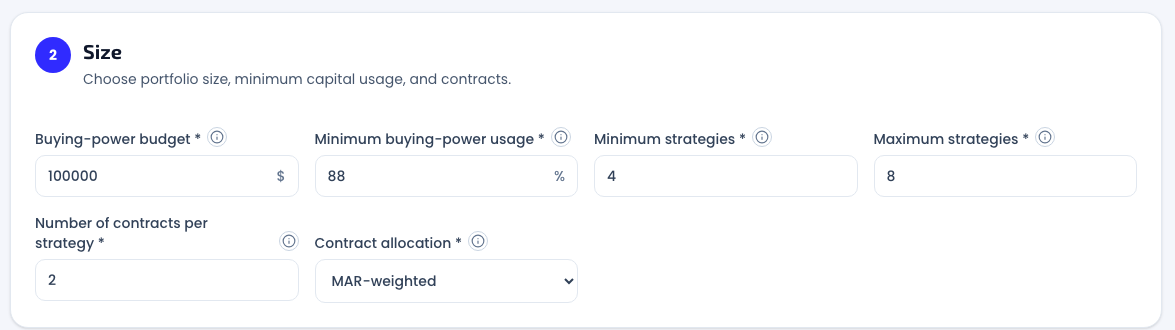
Buying-power budget
The total margin budget in dollars — a ceiling, never a target. As the results banner puts it: "buying power is a ceiling." It is a number you type — never read from a brokerage account.
How much of the budget one contract consumes depends on the structure, and Hunter 3.0 computes this family-aware, on the same basis as the Strategy Browser and the Portfolio Builder: a single-sided credit spread binds (width − premium) × 100; a two-sided structure (MEIC, the ratio structures) is margined on the larger side only — only one side can finish in the money — while both collected premiums reduce the requirement, so one contract binds (width − both premiums) × 100. That netting is also why the results table reports BP (netted) — see Results & history.
Minimum buying-power usage
The one field in the whole form with a default: 88%. Every result must actually deploy at least this share of the budget, measured on the netted figure — with a $100,000 budget, only portfolios using $88,000–$100,000 qualify. It exists because an optimizer maximizing P/L under a pure ceiling can happily return a portfolio that leaves half your capital idle; the floor forces the solve to answer the question you actually asked. Raising it narrows the result set; lowering it admits smaller deployments.
Minimum / maximum strategies
The size range of the portfolio, from 3 to 40 distinct strategies. Hunter searches the whole range at once and the candidates it returns can land on different sizes within it — the size column tells you where each ended up.
Number of contracts and allocation
Number of contracts per strategy (1–50) means one of two things, and the Contract allocation selector — which appears as soon as you enter more than 1 — makes the choice explicit:
| Allocation | What the contract number means |
|---|---|
| Uniform | Every selected strategy gets exactly this contract count |
| MAR-weighted | This is the maximum; each strategy gets 1 up to this many contracts, scaled by a fixed, disclosed MAR blend |
The MAR-weighted blend is mechanical and printed in the field's help text: 20% recent-period MAR + 80% reference-period MAR (reference-only when no recent period is selected). Stronger risk-adjusted records get more contracts, weaker ones get fewer, deterministically — same inputs, same quantities, every time. Set the contract count to 1 to get structures only: pure strategy selection, with sizing left entirely to the Portfolio Builder, where every quantity stays editable regardless.
The submit bar keeps score
Below the three stages, the bar lists every required choice still missing ("Still needed: …") and flips to "Your settings are ready. Start the portfolio search when you're ready." once the form is complete. The Build portfolios button stays disabled until then — the run is defined by what you entered, and nothing is filled in for you.

Related pages
Get the weekly 0DTE research email
Research notes and product updates, straight to your inbox. Unsubscribe anytime.