
Portfolio Hunter
Hunter 3.0 solves your rule-set exactly: you author every rule, it returns up to seven compliant portfolios — candidates to inspect, never a recommendation.
The Portfolio Hunter turns portfolio construction inside out. In the Strategy Browser you pick strategies one by one; in Hunter you write down the rules a portfolio must satisfy — which families and structures, how much buying power, what limits the result must respect — and press Build portfolios. The engine returns up to seven portfolios that satisfy every rule at once. Not a suggestion list: an exact solve of the program you wrote.
This section documents Hunter 3.0, the current Hunter at
/workbench/hunter since August 2026. It replaced the original Hunter, which
remains reachable for its saved rule-sets and history — see
Hunter 2, the legacy tool.
Where it lives, who has it
Hunter sits in the sidebar under Portfolio, at /workbench/hunter. It is
included with the Blueprint plan. If your account doesn't have access, the menu
item simply isn't there and the page redirects to the Strategy Browser — there
is no locked teaser.
Everything starts blank — deliberately
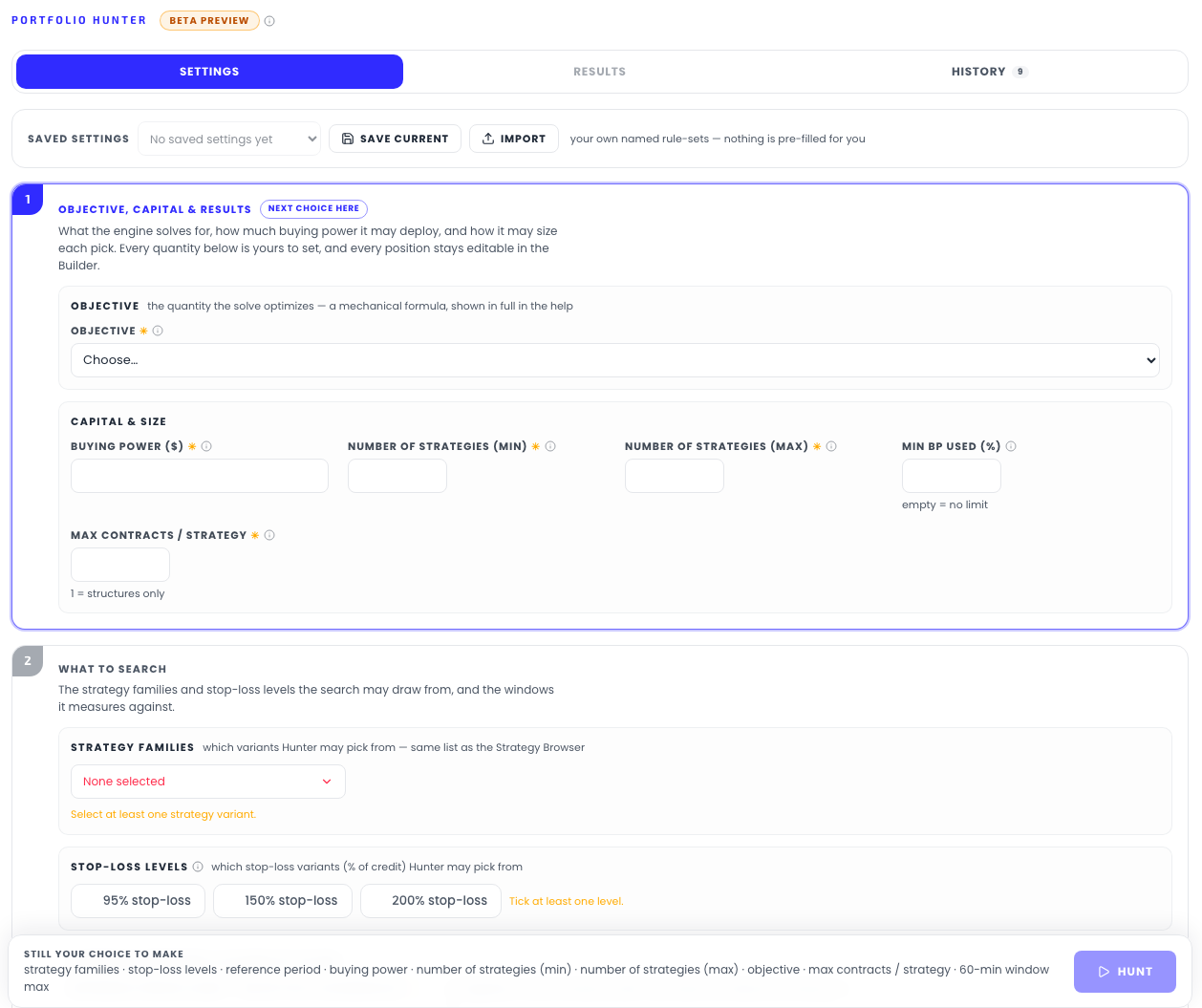
The settings form starts empty. Strategy universe, stop-loss and width levels,
periods, budget, portfolio size — every required field carries a * and the
bar below the form lists what is still missing until you set it. The one
pre-filled number is the minimum buying-power usage of 88%, a disclosed,
freely editable convenience — everything else is your choice, every time.
That is a design position, not laziness: Hunter executes a program you wrote. There are no risk presets, no house recommendations, and no composite score ranking the output. Run it twice with different rules and you get different tables.
One fixed objective, fully disclosed
Hunter 3.0 removed the objective picker the original Hunter had. Every run optimizes the same thing, stated on the form itself: "One fixed objective maximizes reference-period P/L after every guardrail." The server's own formula line, printed verbatim in every result's Exact formulas used panel:
maximize contract-weighted reference-period P/L after every eligibility and guardrail rule; return up to seven materially different portfolios in best-first order.
"Best" therefore always means one mechanical, disclosed thing — the highest backtested P/L over the reference window you chose, among portfolios that pass the rules you set. What varies between runs is your program, not a hidden preference of the tool. If you want a low-drawdown result, you say so through the guardrails, and the optimizer finds the highest-P/L portfolio that honors them.
What a run does
Press Build portfolios and the Results tab opens on a progress card — "Checking every guardrail…" — while the server fetches the candidate pool for your windows, applies your eligibility filters, and runs an exact optimization. A run typically takes from a few seconds up to a couple of minutes, depending on how many rules read daily series.

The result is a set of up to seven rows labeled Candidate A through G: A is the exact optimum under your program, B–G are the next-best portfolios that are materially different from every row above them — genuinely distinct alternatives, not the same picks reshuffled. Any row can be loaded straight into the Portfolio Builder, where every position stays editable.
Two runs can't overlap: if your previous search is still finishing on the server, a new Build portfolios answers "Your previous portfolio search is still finishing on the server. Try again shortly." — wait for it rather than re-clicking.
The three tabs
- Settings — the rule-set form, in three numbered stages: Match & Size and Guardrails. Rule-sets can be saved under your own names, imported and exported as JSON.
- Results — the candidate portfolios and everything inside an opened row. See Results & history.
- History — every portfolio you picked from Results, logged with its full rule-set and KPIs, recallable and comparable side by side.
What the numbers are — and aren't
Every figure on a Hunter result is computed on the reference window the search optimized — by construction it looks good there. Hunter's job is to make that visible, not to hide it:
- The results table says it in its own introduction: candidates are ordered by the disclosed solver estimate, and the displayed P/L is the calendar-aligned portfolio figure — the same basis the Portfolio Builder and Portfolio Analytics use — with the solver's estimate shown separately.
- The Exact formulas used panel prints the precise formula behind every rule of your run.
- The run comparison marks per-metric extremes only, and states: "no overall winner is assigned."
- The combined-DD cap's honest limits — an in-sample shaping constraint, not a forward promise — are documented on the guardrails page.
The original Hunter's out-of-sample machinery — the Luck Check and walk-forward validation — is not part of Hunter 3.0. A search across thousands of rule-satisfying candidates finds extremes, and extremes are partly selection luck; nothing in a Hunter result adjusts for that. Treat every row as a starting point to stress-test — the Monte Carlo simulator exists for exactly that — not as a validated outcome.
Hunter 2, the legacy tool
The original Hunter remains available, unchanged, at
/workbench/hunter-v2 — an unlisted address for users who still rely on its
saved rule-sets and run history. Hunter 3.0 starts with its own fresh settings
and history; nothing carries over automatically, and nothing in Hunter 2 is
lost. The legacy page carries a banner linking back to Hunter 3.0.
Related pages
Get the weekly 0DTE research email
Research notes and product updates, straight to your inbox. Unsubscribe anytime.