
Export to OptionsApp
Send an Engine portfolio to OptionsApp for automated execution on Interactive Brokers: the export, the import steps, what the file contains, and the risks.
Once a portfolio is designed and stress-tested in the Engine, Export to OptionsApp hands it to a tool that can place and manage those trades for you, fully automated, through your own Interactive Brokers account. The whole transfer takes about a minute. This page walks the entire round trip — export, import, activate — and is honest about where the risk sits.
What OptionsApp is
OptionsApp is external software — not part of Cashflow Engine. It is a separate product from a separate company (optionsapp.de). We document it here because it pairs well with the Engine, but we don't build, own or control it. You use it under OptionsApp's own terms, on your own broker account, at your own risk.
OptionsApp (optionsapp.de) is a specialised Windows desktop application for fully automated options trading. By its own description, it executes user-defined strategies precisely and rule-based, without manual intervention — and it deliberately does not develop or recommend strategies; it only handles their clean technical execution, monitoring and documentation. It runs permanently connected to Interactive Brokers' Trader Workstation (TWS).
That makes it the natural other half of the Engine: the Engine is where you decide what to trade; OptionsApp is one way to execute it — how automated options execution works in general is covered in How Automated Options Trading Actually Works. The two are separate products from separate companies. The Engine never touches your broker, and OptionsApp never sees your Engine data except through the file you export.
OptionsApp offers a 30-day free trial. The link opens their homepage, where the banner is that 30-day offer: start a free trial (affiliate link — the app discloses the relationship at the point of export too). Their own setup and usage documentation, including the import step, lives in their video-based knowledge base at optionsapp.de/docs.
Who this is for: IBKR and its introducing brokers
OptionsApp connects through Interactive Brokers' TWS, so it works for anyone trading on IBKR's infrastructure. That is a larger group than "an Interactive Brokers account": several European brokers operate as introducing brokers of Interactive Brokers, giving you IBKR's platform, execution and TWS under their own brand and support. The common ones for this audience:
- CapTrader — a German introducing broker on IBKR infrastructure.
- LYNX — a European broker offering direct access to IBKR's markets.
- WH SelfInvest — likewise routes to IBKR's stock, options and futures offering.
If your account is with any of these — or any other IBKR introducing broker — you are on IBKR and TWS, and the OptionsApp export works the same way. Where this page says "Interactive Brokers", read it as "Interactive Brokers or any broker built on top of it."
The full walkthrough
1 — Export from the Engine
Open the portfolio you want to trade in the
Portfolio Builder. In the video that's a
Hunter run named Hunter_Run_101. Note the portfolio's name — you'll reuse it
in a moment — then open the Export dropdown in the toolbar and choose
Export to OptionsApp.

A .json file downloads in OptionsApp's own trade-config format — that's the
file you hand over next.
2 — Import in OptionsApp
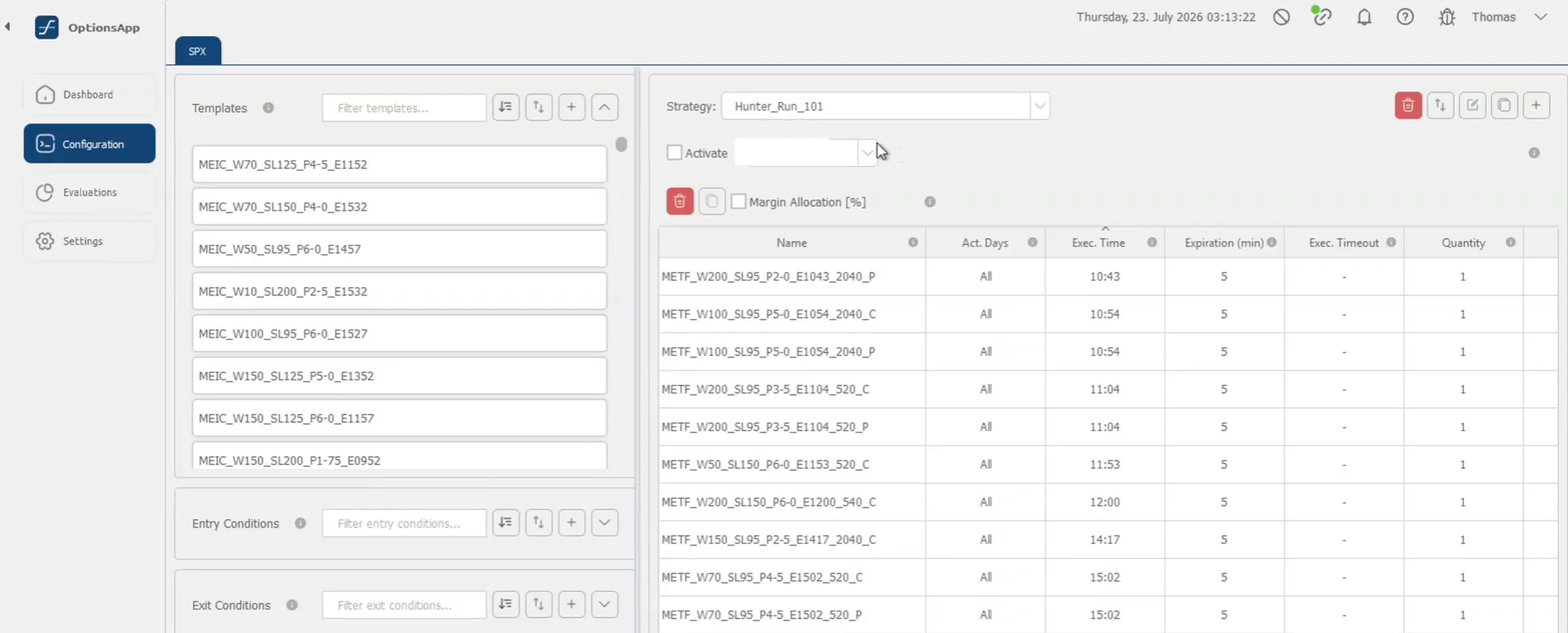
In OptionsApp, open Configuration. The Import button is the two-arrows
icon in the top-right corner of the strategy panel. Press it, choose your
exported file (Hunter_Run_101 in the example) and Open, then confirm the
import. It takes a few seconds to set up every configuration — the strategies,
the entry conditions and the per-strategy details all come across.
3 — Rename to the Engine strategy name
The import lands under a generic name. Rename it to the same name it has in
the Engine (here, Hunter_Run_101). This isn't cosmetic: keeping the names
identical is what later lets you line up live results against the backtest you
ran in the Engine. Same name in both places, always.
4 — Activate the account and review
Tick Activate and assign your account. OptionsApp now shows the strategies
you assembled, together with their entry conditions — METF variants carry
their EMA trend gates (e.g. EMA 20 > 40), while MEIC entries are
unconditional. Take the time to read every row here.
5 — Watch the dashboard
Open the Dashboard. It shows the day's status: which trades are scheduled to enter, their state (pending, running, closed), and the live P&L as the day plays out.

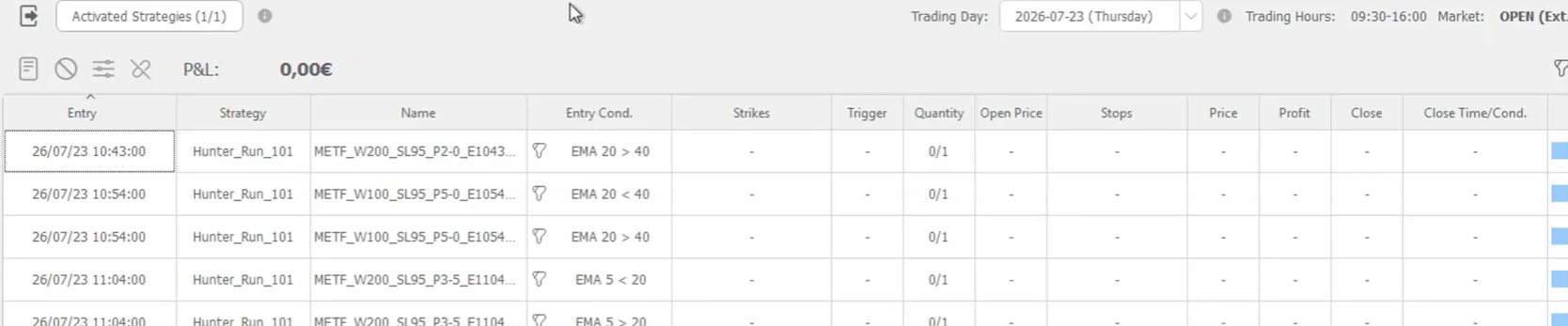
Connected to your TWS, OptionsApp then trades the schedule automatically. Setting up OptionsApp itself — the TWS connection, market data, templates — is covered in OptionsApp's own video tutorials.
What the export file contains
Export to OptionsApp produces a .json file in OptionsApp's trade-config
format, so a portfolio you designed here can be set up for automated execution
through your own account and broker connection.
Inside the file:
- Iron condors are split into two vertical credit spreads — one call-side
and one put-side template per MEIC, never a single four-leg combo. You can see
this directly in the imported list: each MEIC and ratio appears as a
…_Cand a…_Prow. That's the shape OptionsApp manages natively, and it matches how the stops work. - Each template carries the leg structure: short leg to sell at your target premium with the stop loss enabled, long wing offset by the spread width, on SPX (SPXW).
- Your entry times travel as scheduled trades with the per-strategy contract quantities.
- METF variants include their EMA trend conditions as entry conditions; MEIC entries are unconditional. There are no close conditions beyond the short-leg stop — the "enter, stop, or settle" behavior you backtested.
- The broker account field is deliberately blank; you assign your own account in OptionsApp on import.
- Strategy names are written in whichever nomenclature the Format switch is showing at export time — flip it before exporting if you want the other one.
One-way, by design
OptionsApp files are an execution hand-off, not a portfolio container — the Engine cannot re-import them. Keep a Native Engine Portfolio export alongside if you want a round-trippable record of the same portfolio.
Your risk, your account — start on paper
Be clear-eyed about what this hand-off is: a file crossing a boundary between two independent systems, headed for a tool that will place real orders on your real broker account.
- We cannot guarantee the export works end to end. OptionsApp is a separate product that evolves on its own schedule; a format or behavior can change without notice, and a config that imports cleanly can still behave differently from what you intended.
- Running an exported configuration live is entirely at your own risk. Verify every parameter in OptionsApp yourself — strikes logic, premium target, stop level, entry times, quantities, account assignment. The exported settings are a starting point, not a finished trading system.
- Start with a paper-trading account. Import the file, run it on paper first, and confirm it does what you expect — right times, right structures, stops firing where they should — before a single real dollar is at stake. A paper run costs you days; a misread config costs you money.
The validation acknowledgment
The first export (and again when the underlying data vintage changes) shows a confirmation: the Engine surfaces strategies that match your filters — it does not provide trading advice — and asks you to confirm that you have independently validated the strategy before exporting it for live execution. That's not a legal fig leaf; it's the actual workflow.
Sensible hand-off checklist
- Stress-test the final portfolio — with stress events on.
- Export to OptionsApp and import there; verify every template against your own intent.
- Keep the same strategy name in both tools so you can compare live results to the backtest.
- Run it on paper until you trust it.
- Go live smaller than the backtest sizing. Live fills and backtest fills are related, not identical.
Related pages
Get the weekly 0DTE research email
Research notes and product updates, straight to your inbox. Unsubscribe anytime.