
Exports & Integrations
Choose the right Portfolio Builder export: native backup, Excel analysis, OptionsApp, or the tradeSteward beta hand-off.
A portfolio that lives only inside an analytics tool doesn't trade. The Export dropdown in the Portfolio Builder's header turns the construction you settled on into files.
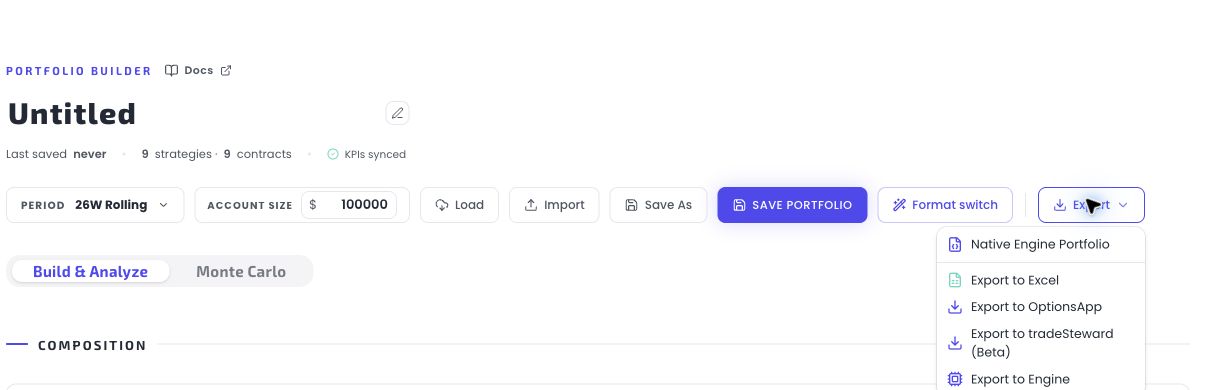
The four exports
| Export | Produces | Use it for |
|---|---|---|
| Native Engine Portfolio | A .cfe-portfolio.json file | Sharing and backup. The only format that round-trips: import it back and you get the same portfolio — strategies, contract counts, on/off states, aliases, account size. |
| Export to Excel | An .xlsx workbook | Offline analysis, record-keeping, or as an entry template. One row per enabled strategy with parameters, sizing and metrics. |
| Export to OptionsApp | An OptionsApp-compatible .json config | Setting up automated execution through your own OptionsApp + broker setup. One-way: it can't be re-imported. |
| Export to tradeSteward (Beta) | A .zip of tradeSteward import files plus a manifest | Setting up execution through your own tradeSteward + broker setup. A mixed portfolio splits into separate import files; each names the exact disabled Base Settings Bot to use and the manual EMA or RIC/VIX setup required after import. The popup offers full MEIC or separate spreads; RIC exports as one long iron condor. One-way, like the OptionsApp export. |
Two ground rules that apply to all exports:
- Exports include enabled strategies only (the Native format additionally remembers your disabled rows so the round-trip is lossless).
- Exporting is available once the portfolio has at least one enabled strategy.
The import counterparts
Exports are half the story — the Engine also ingests:
- Native Engine Portfolio files import via the Builder's Import button (see Saving, loading & sharing).
- Your own backtest and live-trade data import via the Import page in the left nav — covered in Importing your data.
Working from your AI app
The same portfolios and analytics are also reachable from Claude, ChatGPT and other MCP-compatible AI apps through the Cashflow Engine MCP connector — ask in plain English to search strategies, analyze a portfolio or run a Monte Carlo. Setup and limits are on the AI & MCP page.
Detail pages
- Excel & Native Portfolio — formats, file contents, and the round-trip rules.
- OptionsApp export — what the file contains, how iron condors are split, and the validation acknowledgment.
- tradeSteward export (Beta) — the first-time setup, ZIP import, required METF EMA step, verification, and the controls that can start live trading.
Get the weekly 0DTE research email
Research notes and product updates, straight to your inbox. Unsubscribe anytime.