
Objective, capital & search
Hunter's first two steps: the three objectives, buying power and sizing, strategy families, stop-loss levels, and the reference window plus its optional short-window filter.
The Settings tab is a three-step form. This page covers Step 1 — Objective, capital & results and Step 2 — What to search; the third step has its own page, Guardrails. Every field described here starts empty — the ✳ mark means "required, not pre-filled".
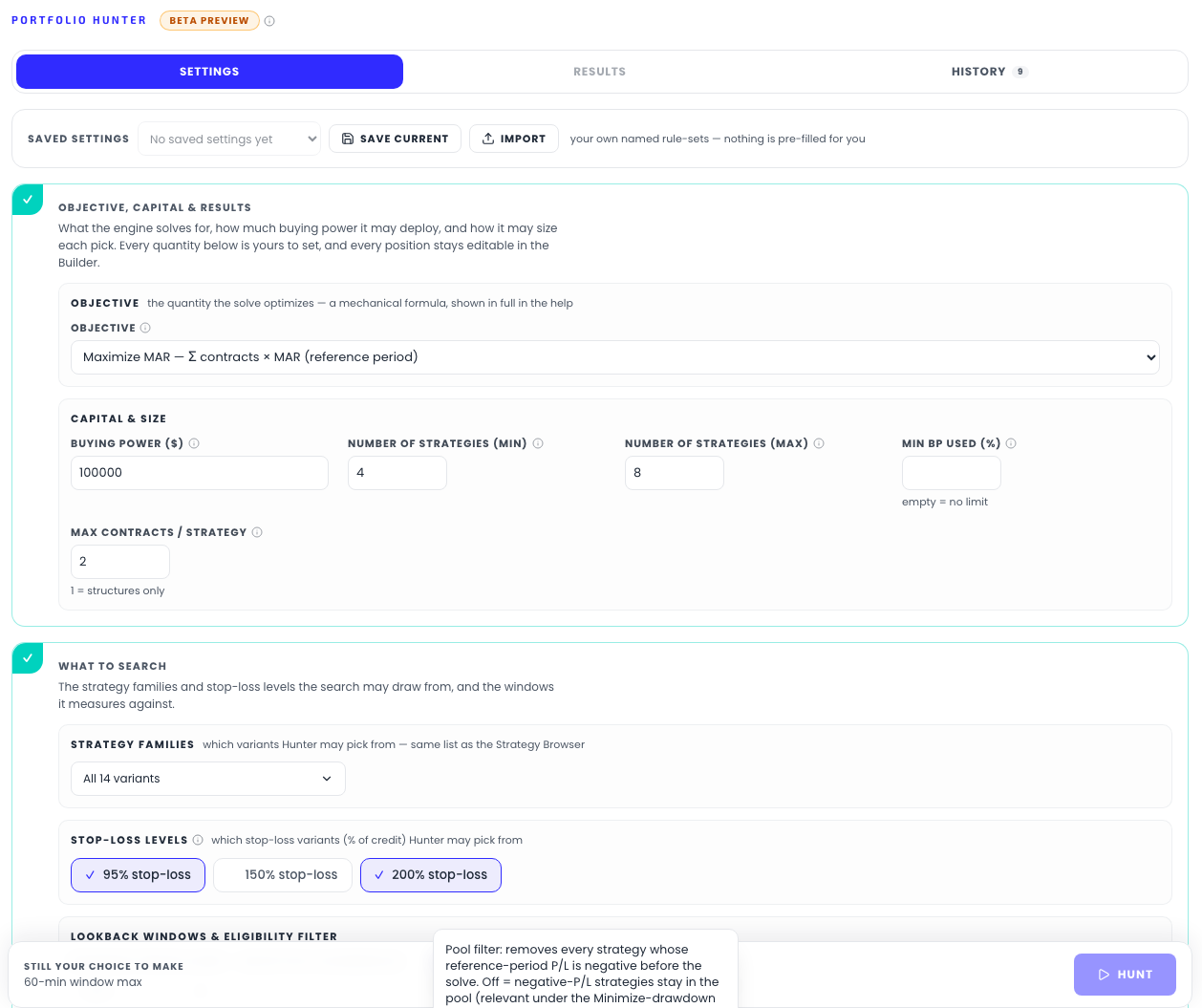
The objective
The single most important choice: what does "best" mean to you? The form offers three, each a mechanical, fully disclosed formula — the help text shows the math, and the product's own words apply: "your definition of what to solve for, not ours."
| Option | What it does |
|---|---|
| Maximize P/L | Maximizes the sum over contracts of each pick's reference-period P/L |
| Maximize MAR | Maximizes the contract-weighted sum of reference-period MAR ratios; strategies with undefined MAR contribute 0 |
| Minimize drawdown | Minimizes the contract-weighted sum of per-strategy reference-period max drawdowns |
One property of Minimize drawdown deserves its own warning, and the help text states it: it bounds a sum of individual drawdowns, not the combined curve — and since fewer, narrower spreads always draw down less, this objective prefers deploying as little as possible. Two other controls exist precisely to counter that: the Combined DD cap guardrail bounds the real portfolio curve directly, and Min BP used (%) stops the solve from leaving your capital idle.
Capital & size
- Buying power ($) — the total margin budget, minimum $5,000. One contract of a spread consumes (width − premium) × 100, and the solve keeps total deployed buying power under this number. As the help text says: "It is a number you type — never read from a brokerage account."
- Number of strategies (min / max) — Hunter solves every size in this range (2–40) and gives each its own results row. Ranges wider than 9 sizes are scanned adaptively — a coarse grid first, then refinement around the best size — and the results footer lists exactly which sizes were solved.
- Min BP used (%) — optional floor on how much of the budget must actually be deployed, capped at 95% ("a solve pinned to the last dollar rarely finds a mix"). Empty = no floor.
- Max contracts / strategy — ceiling on contracts per pick, 1–50 — the same ceiling for every pick, with the optimizer free to allocate less under your objective. Buying power scales with contracts, so this is what lets a small portfolio use a large budget. Set it to 1 to get structures only — pure strategy selection, with sizing left entirely to the Builder. (An earlier WMAR-weighted sizing policy was retired in July 2026 precisely because its out-of-sample value was never established — sizing carries no platform judgment; old runs in your history that used it are labeled.)
What to search
Strategy families
The variants dropdown offers the same 14 database variants the Strategy Browser knows: MEIC (Both Sides / Put-only / Call-only), the two ratio structures (1P:2C and 1C:2P), and METF with its three EMA pairs (20-40, 5-40, 5-20) — each in Both-Sides, Put-only and Call-only form. Tick any subset; the button reads "All 14 variants" or "n selected".
Stop-loss levels
Three toggles — 95% / 150% / 200% stop-loss — controlling which stop-loss variants may enter the pool. Stop-loss is a percentage of the credit collected (SL200 closes the trade at 2× the premium). Tighter stops cap the per-trade loss but stop out more often; wider stops ride through more noise. Untick a level and those variants are out of the universe entirely.
The lookback window
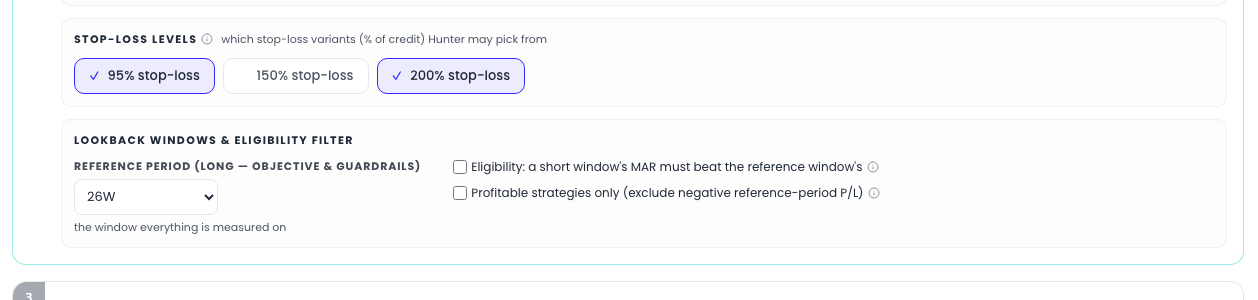
You are asked for one window, with the same options as the Browser's period selectors (1W–52W rolling, 1M–24M calendar):
- Reference period (long — objective & guardrails) — "the window everything is measured on": your objective, every drawdown rule, the result columns.
A second, shorter window exists — but only where it is actually used, which is the eligibility filter below. Hunter used to ask for it up front; since the WMAR sizing policy was retired, the filter became its only consumer, so asking for it unconditionally would have been a question whose answer changed nothing. Turn the filter on and the base-period selector appears, indented under it.
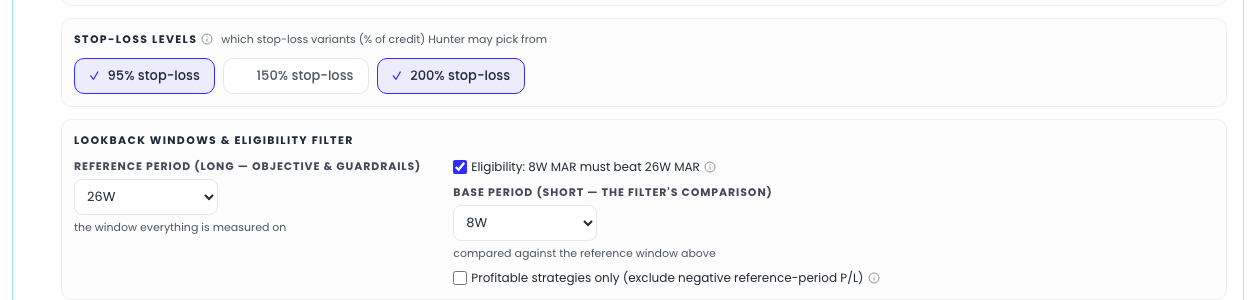
Note for later: the walk-forward panel reads anchored history precomputed for the 8W/26W pair — so a 26W reference period is what to choose if you want to validate the configuration out of sample. With the eligibility filter off, a 26W run still qualifies (the substituted base window matches).
Two pool filters, both off until you switch them on
- Eligibility filter — "Eligibility: a short window's MAR must beat the reference window's". A momentum gate: only strategies whose recent risk-adjusted performance beats their longer-run record qualify. Switching it on reveals Base period (short — the filter's comparison), the window that gets compared against your reference period. The help text notes walk-forward testing showed this filter protects in regime shifts — worth leaving on unless you are deliberately experimenting.
- Profitable strategies only — removes every strategy with negative reference-period P/L before the solve. Its history is disclosed right in the help text: "This filter ran silently until 2026-07; it is now your choice." Relevant mainly under the Minimize-drawdown and Maximize-MAR objectives, where unprofitable-but-quiet strategies can otherwise look attractive.
The run bar keeps score

At the bottom, the sticky bar lists every choice still missing, and — once the form is complete — echoes your entire rule-set in one line before you press Hunt. That echo is part of the design: the run is defined by what you entered, and the tool restates it so there's no ambiguity about whose program just ran.